Wednesday, 26 October 2016
Cache Memory
02:09
Cache
Memory: - Cache memory is one of
the fast and small memory. It is placed between the CPU and main memory. The
access time of cache memory is less than main memory by the factor of 5 to 10.
Cache is the fastest component in the memory hierarchy and approaches the speed
of CPU components. The operation of cache memory is as follows: When CPU needs
access memory. The cache is examined. If the word is found in the cache it is
accessed from cache memory. If word is no found in the cache memory, then it is
accessed from main memory.
The performance of cache memory is frequently
measured in terms of quantity called hit
ratio. When CPU refers to memory and finds the word in cache, it is said to
produce a hit. If the word is not
found in cache, it is in the main memory and it counts as a miss. The basic characteristics of cache memory is its fast access
time.
Mapping:
- The transformation of
data from main memory to cache memory is referred to as a mapping process. Each memory address maps to exactly one set in the
cache. Some of the address bits are used to determine which cache set contains
the data. If the set contains more than one block, the data may be kept in any
of the blocks in the set.
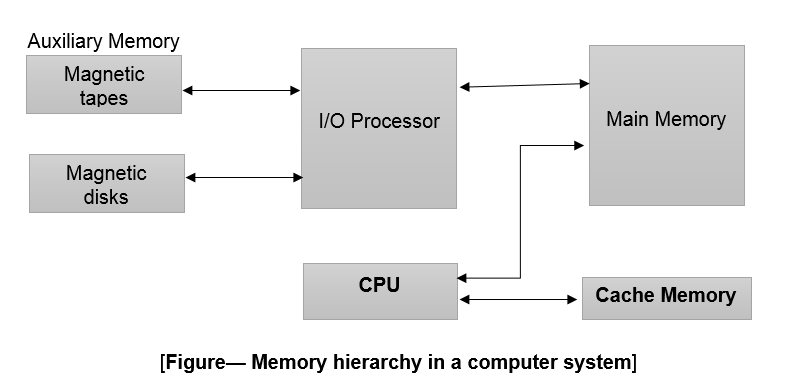
Three
types of mapping procedures are of practical interest when considering the
organization of cache memory:
- Associative mapping
- Direct mapping
- Set-associative mapping
Associative
mapping: - The
fastest and most flexible cache organization uses an associative memory. The
associative mapping stores both the address and data of the memory word. This
permits any location in cache to store any word from main memory.
Caches are classified as either write-through cache or write-back cache. Modern caches are
usually write-back, because main memory access time is so large.
·
In
a write through cache, the data written to a cache block is simultaneously
written to main memory. A write-through cache requires no dirty bit but usually
requires more main memory writes
·
In
a write-back cache, a dirty bit (D) is associated with each cache block
Fundamental of Memory
01:08
The Memory unit is an essential component
in any digital computer. Memory is needed for storing programs and data. The
total memory capacity of a computer can be visualized as being a hierarchy of
components. The memory hierarchy system consists of all storage devices
employed in computer system from the slow but high capacity auxiliary memory to
a relatively faster main memory.
- The memory unit that directly communicate with CPU is called Main Memory. Only programs and data currently needed by the processor reside in main memory.
- Devices that provides backup storage called auxiliary memory. The most common auxiliary devices used in computer system are magnetic disks and tapes. They are used for storing system programs, large data files, and other backup information.
- All other information is stored in auxiliary memory and transferred to main memory when needed.
Very high speed memory is called Cache Memory. It is used to increase the speed of processing by
making current programs and data available to the CPU at a rapid rate. CPU
logic is usually faster than main memory access time. The cache is used for
storing segments of programs currently being executed in the CPU and temporary
data frequently needed in the present calculations. Cache organization is
concerned with the transfer of information between main memory and CPU.
Cache memory is: -
·
Very small.
·
Relatively expensive.
·
and has very high access speed.
·
Cache memory holds those parts that are not
presently used by the CPU.
Main
Memory: - Main
memory is central storage unit in computer system. The principal technology
used for the main memory is based on semiconductor integrated circuits.
Integrated circuits RAM chips are available in two possible operating modes,
static and dynamic. Main memory is: -
·
Fast.
·
Relatively large.
·
And used to store programs and data during the
computer operations.
The
static RAM consist of internal flip-flops that store the binary
information. The stored information remains valid as long as power is applied
to the unit. Static RAM is easier to use and has shorted read and writes
cycles.
The
dynamic RAM stores the binary information in the form of
electric charges that are applied to capacitors. The capacitors are provided
inside the chip by MOS transistors. The dynamic RAM offers reduced power
consumption and larger storage capacity in single memory chip. The dynamic
RAM’s are used to for implementing the main memory. Most of the computer
systems are dynamic RAMs with improved performance characteristics such as multi-bank
DRAM, synchronous DRAM, and Direct DRAM bus DRAM.
Memory
Connections to CPU: - RAM and ROM chips are connected to CPU
through the data and address buses. The data bus of ROM has only one output
capacity, whereas the data bus connected to RAMs can transfer information in
both directions.
Monday, 17 October 2016
Mini Project in HTML,CSS and JS
05:11
DESKTOP GADGETS: MINI-PROJECT IS CREATED BY USING HTML, CSS & JAVA-SCRIPT
This mini project is created by using web-development languages such as HTML, CSS and java script.We can create simple and dynamic projects by using scripting languages. In this mini-project i use simple html tags like <html>,<head>,<div>,<body>,<img>,<br>,<link>,<a>,<font>,<header>,<footer>,<aside>. In CSS, i use separate style sheet and linked that style sheet in html page.In javaScript, i use simple dialogs for admin and user passwords.
- First step: Login with admin password. This dialog box is created by using java script. This is the first page of my project here admin will type password. Without admin password no one can access this project.

- Second Step: After login with accurate admin password user login screen will be open. User need to type here password again for more security purpose. This screen is created by using HTML and CSS. Basic html tags like <div>,<img>,<input>,<button> and <body> tags are used. for CSS Style-sheet is linked by using <link> tag.

- Third Step: Now user desktop will be open with icons. It is created by using HTML and CSS. As we can see different icons in the image given below.First one is image gallery, inside image gallery images are stored and this image gallery is protected with password by using javascrpt. In second icon user cab store different songs and audio it is also protected with password. Third one is TV icon, inside tv icon three channels are provided user can change, pause, play these channels.Forth one is chrome, when user will click on this icon google chrome will be open user can search anything over there.Fifth one is animation different gif images are used over here.Sixth one is online quiz, user can test their iq.Seventh one is Light, here light bulb is created by using html and java-script. User can on - off the bulb. Last one is account setting here, user can change system settings of this mini-project. And we can also see SHUTDOWN button in image given below user can shutdown and restart this project.

- Forth Step: Different applications will be open as user will click on icons. These are created by using HTML, CSS and Java scrpt. This is the view of all desktop icons after user click.

You can visit live this mini-project on you tube. Click the given link below to visit this mini-project working: https://www.youtube.com/watch?v=LUM1BtQUEH8
Subscribe to:
Posts (Atom)


